Next, you will see a blue “Get Access” button — click on it.
Next, download the file
🗂️ 2. Install the EA in MetaTrader
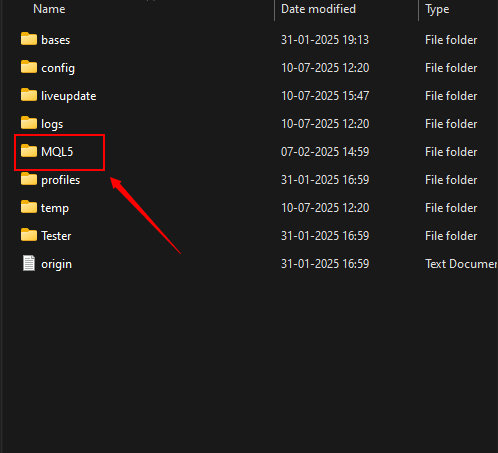
📁 Open MetaTrader → Click on File → Open Data Folder
➡ Navigate to: MQL4/Experts (for MT4) or MQL5/Experts (for MT5)
📌 Paste the EA file in this folder.
🔄 Restart MetaTrader after pasting.
⚙️ 3. Load the EA on a Chart
📈 Open any chart (preferably a major forex pair like EURUSD) 💡 From the Navigator Panel, drag your EA onto the chart. Enable: ✅ AutoTrading ✅ Allow DLL imports
Set your Martingale parameters – Lot size, Step size, Multiplier etc.
▶️ 4. Start Trading
🟢 Click on AlgoTrading (top toolbar). Martingale EA will now begin executing trades based on its algorithm.
🔓 Get All Tools for FREE! ✅ Click here to open a trading account using our referral link and start trading. 📅 After 7 days of active trading under our referral link, you can get Read more…
🔓 Get All Tools for FREE! ✅ Click here to open a trading account using our referral link and start trading. 📅 After 7 days of active trading under our referral link, you can get Read more…
🔓 Get All Tools for FREE! ✅ Click here to open a trading account using our referral link and start trading. 📅 After 7 days of active trading under our referral link, you can get Read more…




0 Comments